"Share this Info and Help a Friend"
NEW: AI Mobile and Desk Phone Service!
"AI Reception, AI Summary, Call Recording Transcription"
Answer Calls and Text on your Desk Phone / Computer / Mobile Phone / Tablet.
TIME = LIFE "TeQ I.Q. Increases your TIME"
TeQ I.Q. is for Customers who Embrace Change, Want Real Support With More Solutions to Increase Sales and Have More Time!
Call Robert at 619-255-4180 to Easily set you up!
TeQ I.Q. Computer Repair, TeQ I.Q. TV, TeQ I.Q. Mobile, TeQ I.Q. Internet, TeQ I.Q. Phone
Apple’s Find My Network “Hijacked”:
YouTube Video "Apple’s Find My Network “Hijacked”
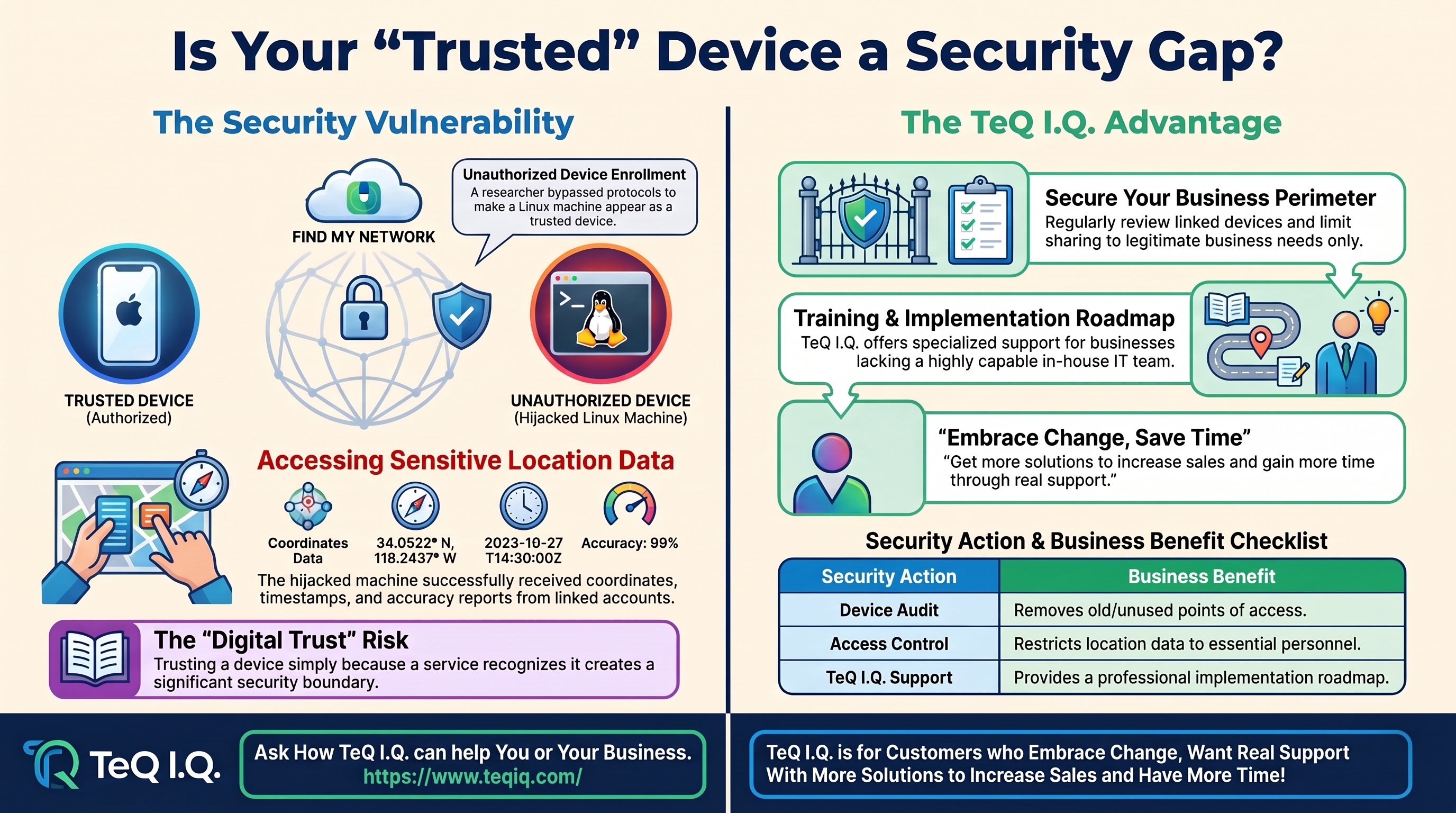
Could your company's connected devices expose more information than expected? A recent demonstration showed how a hijacked Apple Find My network setup could enroll a Linux device and access location data from an Apple account. Learn more about it here.
A Trusted Device Isn't Always What It Seems
Apple designed Find My to work closely with its own hardware and approved third-party accessories. This trust model makes it easier for users to locate devices or share their locations with others, but it may also pose security challenges.
A 22-year-old security researcher, who goes by "Zerotistic," recently documented a way to make a non-Apple machine appear trusted enough to receive that shared information.
How Did the Workaround Function?
Zerotistic spent less than a week reverse-engineering Apple's protocols and figuring out how to register a Linux-based machine with an Apple account. The process involved obtaining an Apple Identity Services certificate and meeting Find My's registration requirements.
Once enrolled, the machine could communicate with Apple's push notification infrastructure and receive location information. The researcher then developed code to decrypt and interpret location reports containing coordinates, timestamps, and accuracy information.
Don't Mistake This for Universal Tracking
It's important to understand that the demonstration had clear limitations. It couldn't locate arbitrary Apple users, and the account needed an existing location-sharing relationship to provide the data. The technique also required substantial reverse engineering and knowledge of Apple's internal protocols.
That's an important distinction when evaluating the risk. Bluetooth tracking and Find My's location-sharing features serve different purposes, and the hijacked network demonstration didn't turn Find My into an open tracking system.
Why This Still Matters to Your Business
Your team might not use Find My to manage company assets, but the underlying issue applies to many connected services. Your business relies on systems that determine which devices and accounts deserve access.
That makes unauthorized device enrollment a security concern worth watching. A trusted device can receive information that an untrusted one cannot. If someone finds a way to make an unfamiliar machine look legitimate, that security boundary becomes less reliable.
The risk grows the more your business handles location data. Company phones, laptops, trackers, and other connected equipment can reveal where people or assets are.
Review What Your Devices Can Access
You don't need to abandon location services because of this finding. Consider the following steps and take a closer look at your connected devices and accounts:
- Review devices linked to company accounts.
- Remove old or unused devices.
- Limit location sharing to legitimate business needs.
- Monitor new device registrations where possible.
- Check which third-party services can access location information.
These strategies won't specifically prevent the demonstrated technique, but they can strengthen your broader approach to access control.
A Lesson in Digital Trust
As your company adds phones, computers, trackers, and cloud services, each new connection creates another potential point of access. The hijacked Apple Find My network demonstration shows why you shouldn't assume a device is trustworthy simply because a service recognizes it.
The takeaway for your business is simple: Know which devices have access, and review those permissions regularly.
Unless you have a highly capable in-house IT team, we recommend working with a provider that offers training, support, and an implementation roadmap like TeQ I.Q. has.
Ask How TeQ I.Q. can help You or Your Business. Go To Web Site https://www.teqiq.com/
TeQ I.Q. is for Customers who Embrace Change, Want Real Support With More Solutions to Increase Sales and Have More Time!
If this tip helps and you would like to donate click on the button. Thanks In Advance.
________________________________________________________________________________________________________
"Fortune Favors, Who Value Time over Money!"
"TeQ I.Q. was the 1st IT Company to Deliver Cloud Solutions since 2003"
Tech issues taking up your Time?
"TeQ I.Q. Makes Your Technology Secure and Protected"
Do you have Tech Frustrations like your Computer, Internet, Phone, Cellphone, Camera, TV, Car?
"We Take Away Your Tech Frustrations and Give You the Free Time You Deserve!"
Call Robert to ask all your Technology questions.
For Free Consultation Call Now Robert Black at (619) 255-4180 or visit our website https://www.teqiq.com/
Chase Bank and Others Trust TeQ I.Q. with their IT and TeQnology so can you!