"Share this Info and Help a Friend"
NEW: AI Mobile and Desk Phone Service!
"AI Summary & Call Recording Transcribed on your Mobile/Desk Phone and PC"
Interested in Taking your Phone Service to the Next Level Watch this TeQ I.Q. Phone Fully Redundant 99.99% Uptime Service Demo 3 Minute Video and see if it would improve your Phone and Mobile Phone Service.
Call Robert at 619-255-4180 to Easily set you up!
TeQ I.Q. Computer Repair, TeQ I.Q. TV, TeQ I.Q. Mobile, TeQ I.Q. Internet, TeQ I.Q. Phone
How to Test Your PC Power Supply:
YouTube Video "How to Test Your PC Power Supply"
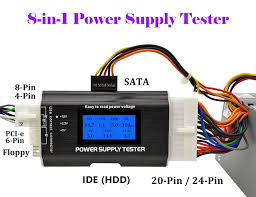
A PSU tester is one of the simplest ways to test your computer's PSU as it offers an all-in-one experience with immediate actionable feedback.
Why Use a PSU Tester?
PSU testers are so cheap and so easy to use that we really can't recommend them enough. If you have a multimeter, you're comfortable using it, and you don't mind testing a bunch of pins and taking notes, you can certainly test your PSU the old-fashioned way.
But, besides the simple plug-and-play ease of using a PSU tester, it has one significant benefit over doing the test manually.
A PSU tester is purpose-built for the task and will give you both immediate feedback on whether or not the connections match the expected voltage and configuration or not as well as loudly alerting you if they do not.
Further, it allows for easy SATA terminal testing (there's no way to easily test the tiny pinout on a SATA connector with a multimeter) and it will give you a readout for the PG value---the "power good" time-to-start delay period---that a multimeter cannot.
Finally, a word on PSU testers: they all look just about the same because they are all just about the same.
A few factories crank out a bajillion of them, and different companies pay to have their particular case and/or logo slapped on the circuit board. But inside, they're identical.
How to Use a PSU Tester
Using a PSU tester is straight forward, but you should always follow best practices. Here's how to test your PSU safely with a tester.
WARNING!
At no point will we be opening up the PSU itself. Doing so without proper precautions, knowledge, and tools can give you a lethal shock.
Before Testing your PSU, Disconnect the Cables
Power off your PSU. If it has a switch, you can use the switch on the back. Otherwise, unplug it. Before using the PSU tester, we recommend unplugging not just the particular cable you wish to test but all the cables linking your PSU to internal components.
Not only will this protect the various components if anything should go wrong, but it's wise to test every cable at once to ensure the PSU is functioning properly across the board.
Attach the PSU Tester and Power Up the PSU
The PSU tester draws power from the PSU itself. To use it, simply turn off the PSU (either with the switch on the back or by unplugging it from the wall).
Then plug in the mother power cable to the tester as well as the CPU power connector cable---if you don't plug in the CPU cable, you'll get an error message. Turn on the PSU.
Reading the PSU Tester Results
The tester will show you various power categories it expects from the motherboard and CPU cables like -12V, +12V, +3.3V, etc. Beneath those categories, it will show you the actual voltage.
It's OK if these values don't match up exactly. If the -12V value is 11.8, that's well within the expected ±5% range acceptable for that connection. And if it were outside the range, the tester would warn you---no math or knowledge of the acceptable range required.
It will also show you the PG value. This value represents how long it took your PSU to go from the first sign of power activity to full voltage across all connections.
An acceptable value is 100-500 milliseconds. A higher value can indicate failing PSU components, and an excessive PG value can cause your computer to get stuck in a boot loop because your hardware components don't power on in the expected window.
You can further test other connections, including the PCI-E, MOLEX, SATA, and 4-pin floppy connector, to ensure each connection delivers the expected output.
Most testers, including the one here, have a simple LED light indicator for the voltages when testing the secondary cables. Because of that, you need to test the cables one at a time (e.g. don't plug in a SATA cable and a MOLEX drive connector simultaneously).
It won't hurt the tester or the PSU, but you won't get an accurate readout for their respective voltages because there is only one set of LED indicators.
If your PSU tests indicate that the expected voltages are out of spec (e.g. you get 8 volts for one of the connections when 12 is expected) or your PG value is over 500 milliseconds, it's time to replace your PSU.
If this tip helps and you would like to donate click on the button. Thanks In Advance.
________________________________________________________________________________________________________
"Fortune Favors, Who Value Time over Money!"
"TeQ I.Q. was the 1st IT Company to Deliver Cloud Solutions since 2003"
Tech issues taking up your Time?
"TeQ I.Q. Makes Your Technology Secure and Protected"
Do you have Tech Frustrations like your Computer, Internet, Phone, Cellphone, Camera, TV, Car?
"We Take Away Your Tech Frustrations and Give You the Free Time You Deserve!"
Call Robert to ask all your Technology questions.
For Free Consultation Call Now Robert Black at (619) 255-4180 or visit our website https://www.teqiq.com/
Chase Bank and Others Trust TeQ I.Q. with their IT and TeQnology so can you!